Non Euclidean Simulation
Challenging myself for simulation of non Euclidean spaces
The Context
As part of Creative Week at Bellecour Ecole, and to challenge myself, I attempted to simulate non euclidean spaces (elliptic and hyperbolic), with a view to potentially incorporating them into a game on the theme of collective hallucinations.
Unfortunately, my level using this simulation could not be used for the game, but I learned a lot, and I still want to do something with it one day.
Dynamic transition between Euclidean, Elliptic, and Hyperbolic spaces.
Learning & Implementation
01. The World Bender Logic
To bend the world without destroying performance, we
must avoid heavy operations like square roots (length) on every vertex. The most optimized approach is to
use a parabolic approximation.
By calculating the squared distance between the vertex and the camera on the XZ plane, we naturally get a parabolic curve. The mathematical formula is:
Where K is our global curvature modifier, P is the vertex position, and C is the camera position.
// 1. Calculate the distance vector on the horizontal plane (ignoring height)
float2 d = Pos.xz - CamPos.xz;

// 2. Calculate squared distance via Dot Product (cheaper than length())
// This naturally creates the parabolic y = x² drop-off curve.
float distSq = dot(d, d);

// 3. Multiply by the Global Curvature (K) driven by the C# Manager
float offset = distSq * K;

// 4. Apply the vertical offset to the vertex
OutPos = float3(Pos.x, Pos.y - offset, Pos.z);
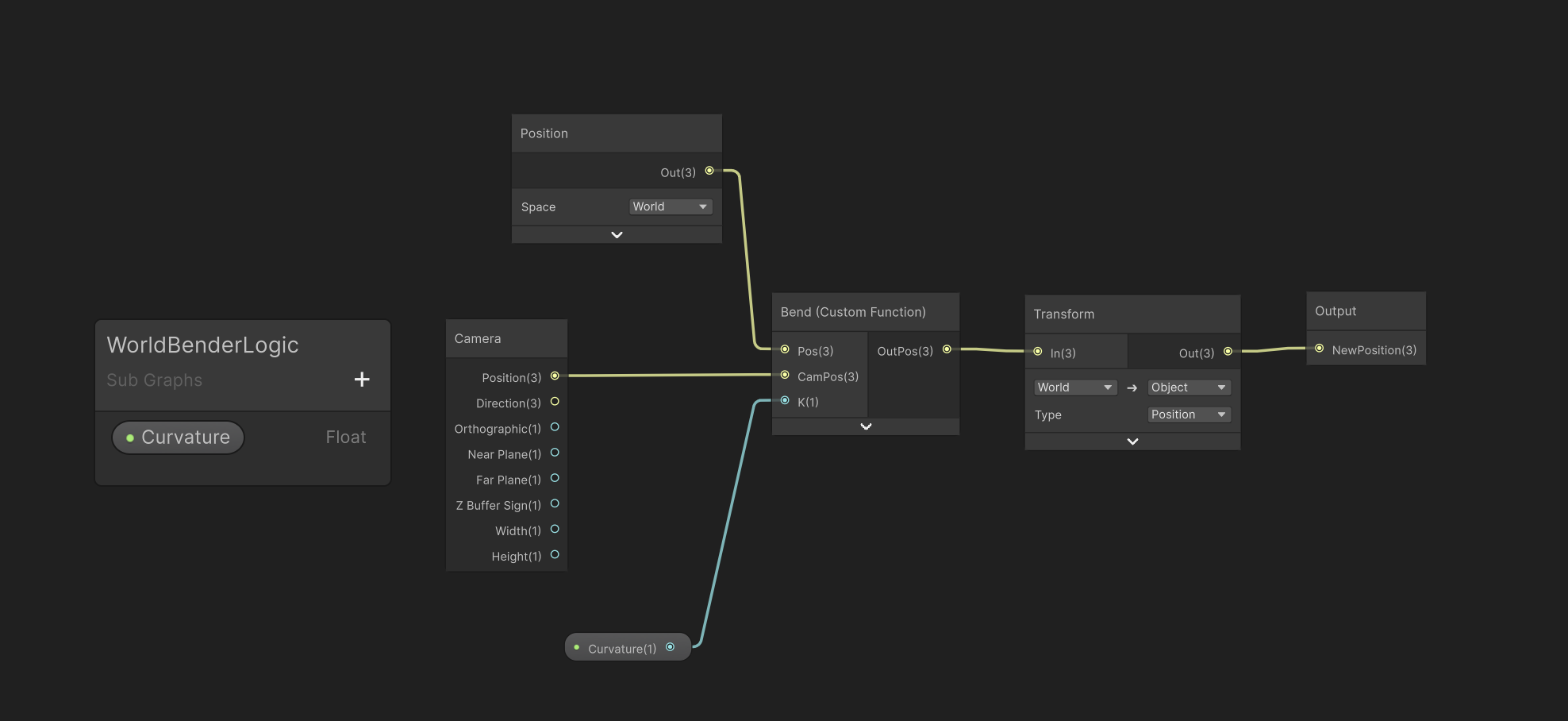
Wrapping the HLSL into a reusable SubGraph.
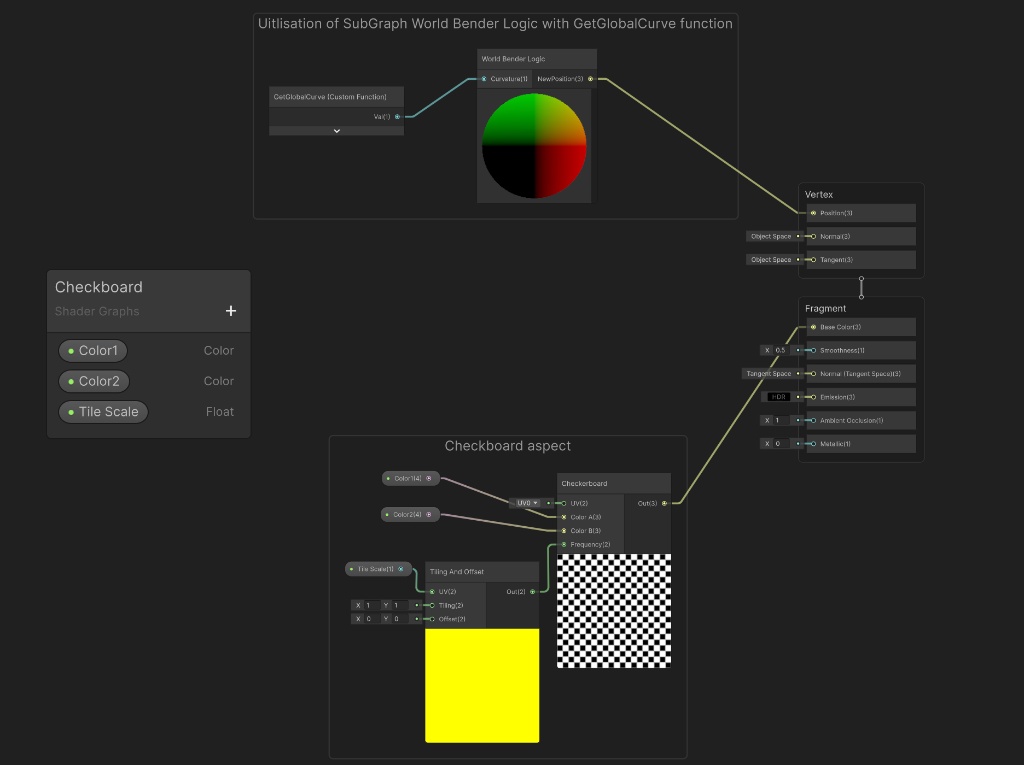
Artist-friendly integration in the Master Graph.
02. The CPU Orchestrator
With the GPU logic in place, I needed a way to control
the curvature dynamically based on gameplay events.
Updating hundreds of materials individually via GetComponent would be a performance disaster.
Instead, I built a centralized Manager that interpolates the target curvature and injects it directly
into the Render Pipeline as a global variable. It runs in
[ExecuteAlways], allowing Level Designers to preview the World Bending
in the editor without entering Play Mode.
using UnityEngine;
using Sirenix.OdinInspector;
using TMPro;

public enum EuclidianMode
{
    Euclidean,
    Elliptic,
    Hyperbolic
}

[ExecuteAlways]
public class EuclidianManager : MonoBehaviour
{
    [SerializeField]
    private float loopDuration = 3f;

    [SerializeField] private float lerpSpeed = 2f;
    [SerializeField] private float curvatureMultiplier = 1f;
    [SerializeField] private bool isInteractable = false;

    [EnumButtons, ReadOnly] public EuclidianMode mode;

    private float currentCurve = 0f;
    private float targetCurve = 0f;
    private int curveID;
    public int currentStep = 0;

    public float CurrentCurve => currentCurve;
    public EuclidianMode CurrentMode => mode;
    public float CurvatureMultiplier => curvatureMultiplier;

    private InputActions ctx;

    private void OnEnable()
    {
        ctx = new InputActions();
        ctx.Enable();
        curveID = Shader.PropertyToID("_DirectGlobalCurve");
    }

    private void OnDisable()
    {
        ctx.Disable();
    }

    private void Update()
    {
        currentCurve = Mathf.Lerp(currentCurve, targetCurve, Time.deltaTime * lerpSpeed);
        Shader.SetGlobalFloat(curveID, currentCurve);

        if (isInteractable)
        {
            if (Application.isPlaying && ctx.Euclidean.ChangeMode.WasPressedThisFrame())
            {
                ChangeEuclideanMode();
            }
        }
    }

    [Button]
    public void SetEuclidean()
    {
        targetCurve = 0f * curvatureMultiplier;
        mode = EuclidianMode.Euclidean;
        currentStep = 0;
    }

    [Button]
    public void SetElliptic()
    {
        targetCurve = 0.01f * curvatureMultiplier;
        mode = EuclidianMode.Elliptic;
        currentStep = 1;
    }

    [Button]
    public void SetHyperbolic()
    {
        targetCurve = -0.01f * curvatureMultiplier;
        mode = EuclidianMode.Hyperbolic;
        currentStep = 2;
    }

    private void ChangeEuclideanMode()
    {
        currentStep = (currentStep + 1) % 3;

        switch (currentStep)
        {
            case 0:
                SetEuclidean();
                break;
            case 1:
                SetElliptic();
                break;
            case 2:
                SetHyperbolic();
                break;
        }
    }
}
03. The Frustum Culling Fix
A major architectural flaw with GPU vertex displacement is the CPU-GPU desynchronization. Unity's CPU handles Frustum Culling based on the original, un-displaced bounding boxes. When the world bends, the displaced vertices might be visible on camera, but the CPU thinks the original object is off-screen and stops rendering it entirely. This causes meshes to randomly pop out of existence.
To fix this without calculating complex dynamic bounds every frame, I wrote a utility script attached to environmental objects. It overrides the mesh bounds at initialization, ensuring the rendering pipeline doesn't prematurely cull bent objects.
using UnityEngine;

public class CurvedObjectBounds : MonoBehaviour
{
    private void Start()
    {
        // 1. Retrieve the MeshFilter component
        var meshFilter = GetComponent<MeshFilter>();

        if (meshFilter != null)
        {
            // 2. Access the instance of the mesh
            Mesh mesh = meshFilter.mesh;

            // 3. Artificially expand the bounding box to a massive size.
            // This forces the CPU to always send this mesh to the GPU for rendering,
            // preventing the object from popping out when the world bends heavily.
            mesh.bounds = new Bounds(Vector3.zero, Vector3.one * 10000f);
        }
    }
}