Neon Racer
Futuristic time trial racing game with a focus on flow and speed.
The Context
Neon Racer is being developed as part of a school project based on designing a controller with good game feel. The project is based on a prototype I made between the end of our previous project and the launch of this one.
In this game, you play a ship that is attracted to the ground regardless of its orientation in a futuristic setting. Our goal is to create a dynamic game with a gameplay loop based on completing a level 100% and competing for the high score.
My Contributions
- 01 Controller Implemented a fully functional controller
- 02 Chrono Implemented a fully functional chronometer system with checkpoints
- 03 Tech Art Implemented a grid synthwave and a checkpoint shaders. Work on Global Volume.
Learning & Implementation
The Hover Physics
The biggest challenge with hover vehicles is making them feel grounded. A simple force often results in endless bouncing. I implemented a Spring-Damper system (Hooke's Law) on each of the 4 thrusters independently. This allows the ship to tilt and react to uneven terrain naturally, just like a car suspension.
// Physics logic applied to each thruster (corner of the ship)

// 1. Calculate Compression (Spring)
// How far are we compressed compared to the target height?
float compression = _currentHoverTarget - hit.distance;

// 2. Calculate Damping (Shock Absorber)
// We check the vertical velocity at this specific thruster point.
// This prevents the ship from oscillating/bouncing endlessly.
float downwardSpeed = Vector3.Dot(rb.GetPointVelocity(thruster.position), transform.up);

// 3. Apply Hooke's Law Formula (F = -kx - bv)
// Spring Strength pushes up, Damper resists the movement.
float force = (compression * settings.springStrength) - (downwardSpeed * settings.springDamper);

// Apply the calculated force at the exact position of the thruster logic
rb.AddForceAtPosition(transform.up * force, thruster.position);
Sticking to the Track (Spline Projection)
In a game with loops and vertical walls, standard gravity doesn't work. Instead of complex raycast averaging, I used the track's Spline Data. By projecting the ship's position onto the spline, I retrieve the exact surface normal and smoothly align the ship's "Up" vector to it. This ensures the ship never falls off, even upside down.
// Aligning the ship to the track surface (Spline)

if (currentSpline != null)
{
    // Project our position onto the spline to find the closest point
    SplineSample sample = new SplineSample();
    currentSpline.Project(transform.position, ref sample);

    // Smoothly blend the ship's "Up" vector towards the track's normal.
    // We use Slerp to keep it fluid, avoiding jerky rotations on steep loops.
    averageNormal = Vector3.Slerp(averageNormal, sample.up, 0.8f);
}

// Calculate the new forward direction relative to this surface normal
Vector3 targetForward = Vector3.ProjectOnPlane(transform.forward, averageNormal).normalized;
Quaternion targetRotation = Quaternion.LookRotation(targetForward, averageNormal);

// Apply rotation using physics
rb.MoveRotation(Quaternion.Slerp(rb.rotation, targetRotation, Time.fixedDeltaTime * settings.alignSpeed));
Audio-Reactive Grid (CPU to GPU Communication)
To enhance the game's retro-futuristic atmosphere, I designed a custom grid shader that reacts dynamically to the music. The technical challenge was analyzing the audio in real-time and passing that data to the GPU without tanking performance. I used Fast Fourier Transform (FFT) to isolate bass frequencies, and a Material Property Block to update the shader efficiently across multiple objects.
using UnityEngine;

public class GridAudioReact : MonoBehaviour
{
    public Material gridMaterial;

    [Range(0f, 50f)]
    public float sensitivity = 300.0f;

    [Range(0f, 1f)]
    public float threshold = 0.1f;

    public float minBrightness = 1.0f;
    private float[] spectrumData = new float[64];
    private float currentEmission = 0f;

    private MaterialPropertyBlock _propBlock = null;
    public Renderer[] _renderer;

    private void Start()
    {
        _propBlock = new MaterialPropertyBlock();
    }

    void Update()
    {
        if (gridMaterial == null) return;

        AudioListener.GetSpectrumData(spectrumData, 0, FFTWindow.Rectangular);

        float bassLevel = (spectrumData[0] + spectrumData[1] + spectrumData[2]) / 3.0f;

        float targetValue = 0;

        if (bassLevel > threshold)
        {
            targetValue = (bassLevel - threshold) * sensitivity;
        }

        if (targetValue > currentEmission)
        {
            currentEmission = targetValue;
        }
        else
        {
            currentEmission = Mathf.Lerp(currentEmission, targetValue, Time.deltaTime * 2.0f);
        }

        foreach (var rend in _renderer)
        {
            rend.GetPropertyBlock(_propBlock);
            _propBlock.SetFloat("_AudioPower", minBrightness + currentEmission);
            rend.SetPropertyBlock(_propBlock);
        }
    }
}
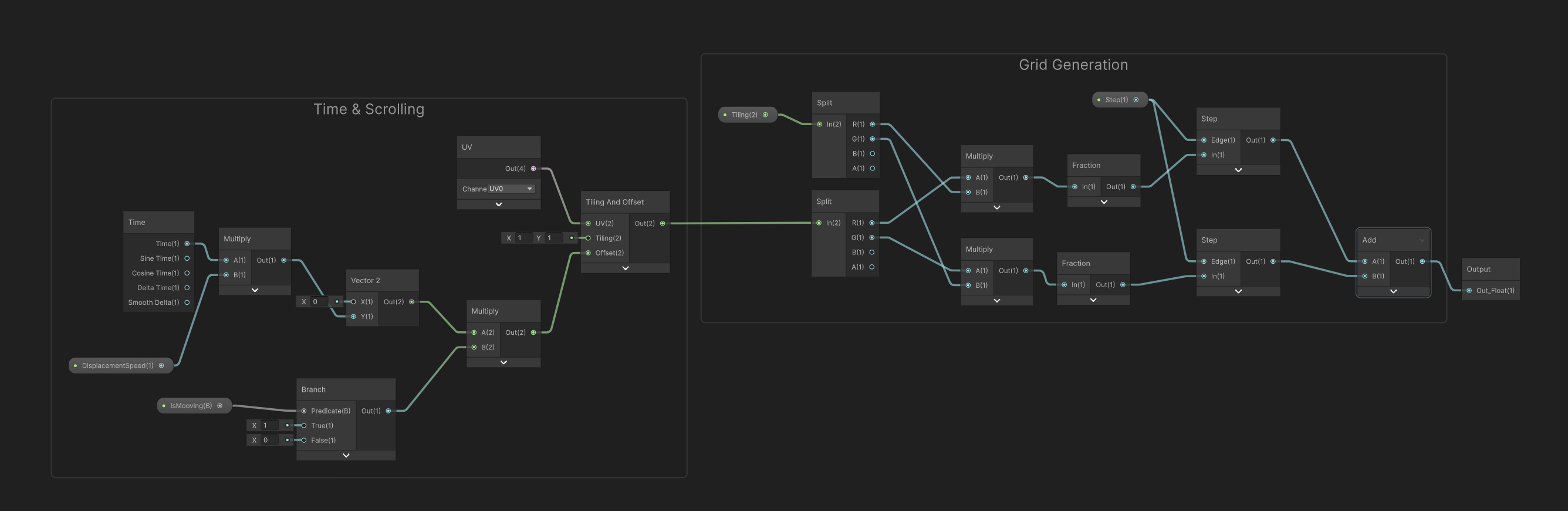
Wrapping the grid generation logic into a reusable SubGraph.
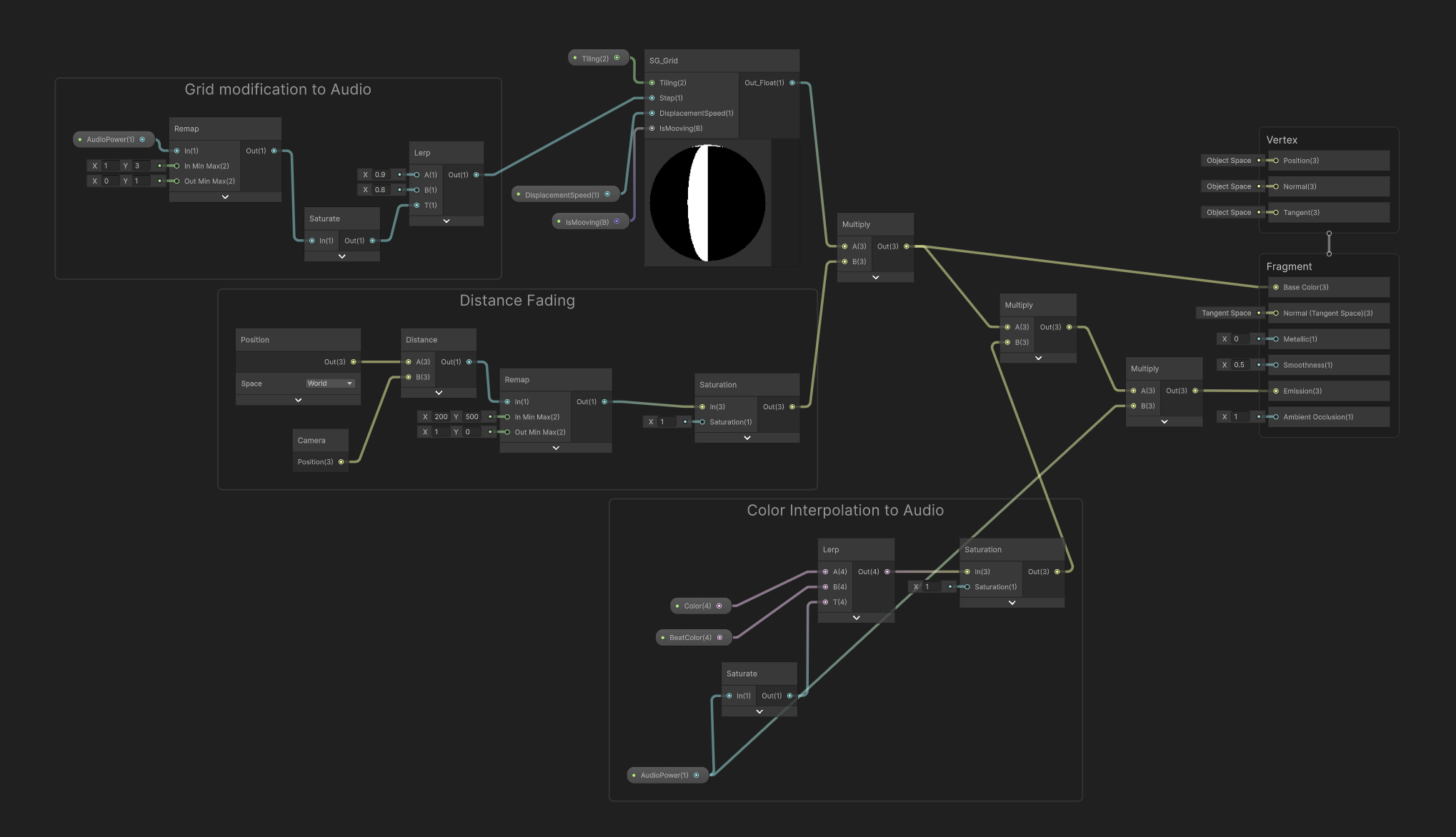
Artist-friendly integration in the Master Graph.