Unity Production Toolbox
A custom suite of Editor tools designed to speed up the workflow of designers, secure scene management, and clean up the Inspector. Tested and used in student productions.
The Context
During my first projects on Unity, I discovered tools made by other people, particularly at my school, which allowed me to solve certain problems I was having. So I decided to create my own tool to solve my problems and make my life easier.
The project is taking shape and is being used in certain student projects. The long-term goal is a public release once the beta testing phase is complete.
01. Robust Scene Referencing
The UX Problem: Hardcoding scene names as strings leads to crashes if a scene is renamed. Furthermore, designers often forget to add new scenes to the Build Settings, breaking the game at runtime.
The Solution: A complete custom SceneReference type. It allows dragging and dropping Scene Assets safely. If the dropped scene is missing from the Build Settings, a custom Property Drawer detects it and displays a one-click button to fix the issue directly from the Inspector.
using UnityEngine;
using RomainUTR.SLToolbox;
using UnityEngine.SceneManagement;

public class TestScene : MonoBehaviour
{
    [SLRequired, SerializeField] private SceneReference sceneRef;

    [SLButton("Load the scene")]
    private void LoadLevel()
    {
        Debug.Log("Loading the scene: " + sceneRef);
        SceneManager.LoadScene(sceneRef);
    }
}
02. Fast Scene Switcher
Navigating through project folders to find a specific level breaks the developer's flow. I created a fast, context-aware Scene Switcher Popup.
Instead of a clunky dockable window, it opens instantly via a custom shortcut or by clicking the scene in Hierarchy. It lists all available scenes and allows developers to jump between environments in a fraction of a second, drastically reducing iteration friction. User can also select some scenes as favorites to have them always at hand, and the popup automatically prioritizes recently played scenes for even faster access.
03. Script Generator
The idea was to enable scripts to be created in a more organised manner, with the appropriate naming conventions and paths stored within the project.
The main issue arose from the creation of .asset files when creating ScriptableObjects; since Unity has to recompile whenever a file is created, it was structurally impossible to create the asset immediately afterwards. The workaround involved using Editor Preferences to store the information required for creation, so that this action could be performed once recompilation was complete.
04. ScriptableObjects Browser
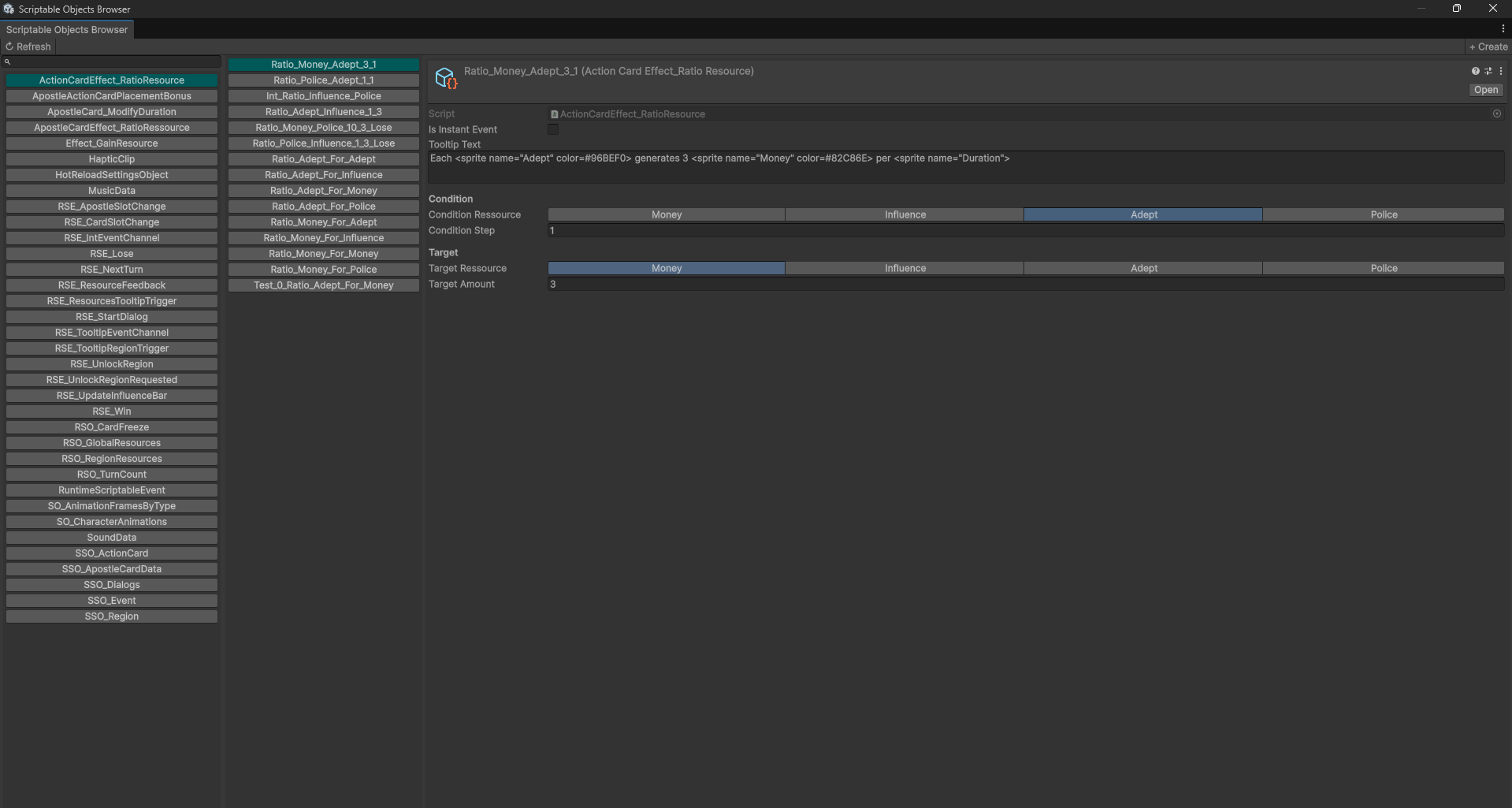
Given that I make extensive use of Scriptable Objects, I thought it would be useful to have a file inspector specifically for them. This browser allows you to view and edit all ScriptableObjects in the project without having to search for them in the Project window. It also supports inline editing, so you can modify values directly from the browser without opening each asset individually.
05. Custom Inspector Attributes
A clean Inspector leads to a cleaner game. Drawing inspiration from heavy plugins like Odin Inspector, I built a lightweight, native attribute library utilizing C# Reflection to empower the team without bloating the project.
[SLButton]
Transforms a standard C# method into a clickable Inspector button. Perfect for triggering debug events or level logic without entering Play Mode.
[SLMinMax]
Converts a Vector2 into a dual-slider. Essential for designers tweaking random ranges (like spawn delays or damage variations).
[SLCallback]
Uses Reflection to invoke a specific method the moment the serialized value is modified in the Inspector. Great for auto-updating visuals in the Editor.
[SLDropdown]
Dynamically populates a dropdown list by calling a function. Prevents spelling errors on dynamic IDs.
[SLReadOnly] & [SLTitle]
Formatting utilities. ReadOnly displays a variable without allowing modification, while Title creates clean, stylized headers to structure massive scripts.
[SLInline]
Allows editing ScriptableObjects directly within the component's Inspector, saving designers from constantly switching contexts.
Roadmap & Public Release
This toolbox is currently in open beta, being battle-tested across student productions to gather UX feedback and fix edge cases. Once the toolbox is fully stabilized, my goal is to package it for a public release on the Unity Asset Store and/or GitHub to help other indie developers speed up their workflows.